Lab Notebooks

The electronic lab notebook service is coordinated between the Open Science and Research Support Division of the Joint Documentation Service (SCD) and the Directorate of Innovation and Partnerships (DIPa), with technical support from the Directorate of Information Systems and Digital Technology (DSIN).
An electronic lab notebook?
The electronic lab notebook (ELN) is the digital counterpart to the paper lab notebook. Like the paper version, it documents research activities and the details of scientific work on a day-to-day basis. It ensures the traceability and reproducibility of research while verifying the quality and accuracy of the data. If necessary, it can serve as proof of prior work and ownership of the data.
It is particularly well-suited to organizations where work involves little or no routine tasks, such as research or R&D laboratories. The main benefits of CLE systems are their ability to quickly retrieve the information and data they contain (search function), to share that information more effectively, and to enhance collaboration. Their structure allows for better data organization and more secure storage.
eLab FTW: The University of Montpellier's Choice
After a period of benchmarking and testing across several departments, the University of Montpellier chose the eLabFTW solution for several reasons:
- Open Science: open-source software licensed under AGPLv3, hosted on GitHub, and originally developed within the French higher education and research sector. It facilitates the production of FAIR data.
- Ease of use: A web application that runs on all operating systems, offered as SaaS by Deltablot (the software’s developer). It is a versatile, user-friendly program that is quick to learn. There is a large user community for eLabFTW. It is used in particular by the CEA, the CNRS, INRIA, INRAE, and the IRD.
- Legal compliance: Complies with the standards for the admissibility of electronic written evidence (Article 1366 of the Civil Code), the General Framework for Improving Accessibility (RGAA), andWCAG 2.0.
It features an eIDAS 2014-certified timestamp. - Data security: fully encrypted data transfer (TLS 1.3). Rated A+ by the HTTP Observatory. Certified “Silver” by the Open Source Security Foundation. This is the first CNRS-certified application, specifically based on security criteria. Approved by the UM’s CISO and FSD. Data stored on a SecNumCloud 3.2 server .
Key Features of eLab FTW
essay
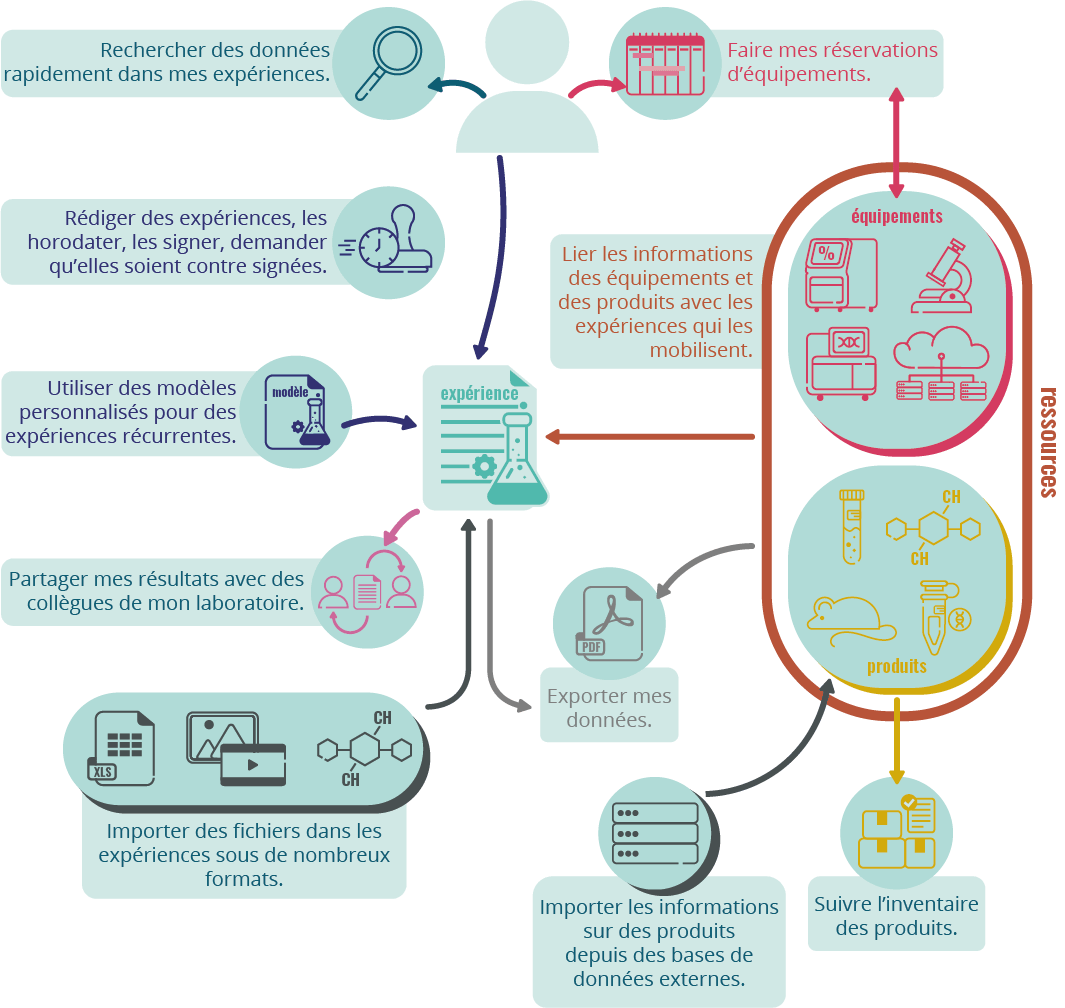
How CLE Supports the Production of FAIR Data
The FAIR principles (Findable, Accessible, Interoperable, Reusable) describe how data should be organized to make it more accessible, understandable, exchangeable, and reusable.
Findable
- Every entry in the CLE has a unique identifier.
- Entries are described using a variety of metadata (author(s), creation dates, tags, list of related files, etc.), which are themselves linked to this identifier.
- eLab FTW has powerful search options that allow you to quickly find data or metadata.
Accessible
- The data may be shared in its entirety with the authors' permission.
- The solution is available online (depending on the system administration settings and the defined permissions).
- Entries can be exported as .pdf files for universal viewing.
Interoperable
- We encourage the submission of data in open formats or formats commonly used within the research communities from which they originate.
- The experiments entered in the CLE are stored in JSON format (an open format).
- eLab FTW is a member of the ELN consortium, which works to promote the .eln standard for CLE workbook data.
Reusable
- CLE allows you to duplicate entries and create reusable experiment templates.
Who is the electronic lab notebook intended for?
The CLE deployed at the University of Montpellier is intended for anyone conducting research in a unit hosted by the University of Montpellier, regardless of their status (researcher, engineer, technician, doctoral student, intern, etc.) or their sponsoring organization.
Access to the service is free, including for non-permanent staff.
How do I access the service?
If your unit is eligible for the service, the DU may submit a request by contacting the project team at: elabftw-assistance@umontpellier.fr. We recommend organizing an informational session within the unit before the CLE opens.
Starting in September 2025, requests can also be submitted through the service center.
Who's coming with me?
The project team supports you at every stage of the CLE deployment:
- One-hour presentation seminar in the departments
- Training on how to use the tool (2 hours), in person or remotely
- Training on how to use the tool (45 min to 1 hr)
- Special Sessions for Doctoral Students in the First Semester
- Supporting Change and Integrating the CLE into Laboratory Operations
- Individual appointments available upon request
Training and support at eLab FTW are available to all UM staff, even if they are using a system provided by another governing body.
Does the lab notebook have legal standing?
Yes. Like a paper notebook, an electronic notebook can serve as evidence of authorship, originality, or prior use in the event of a dispute related to intellectual property.
Traceability is ensured through the authentication (single or double) of contributors and the timestamping of changes. It is possible to have your experiments timestamped by Universign, which guarantees their existence on a given date.
Am I required to use lab notebooks in my unit/team/research group?
No. The UM does not require the use of electronic lab notebooks.
"CLE teams" are open to any research staff member who requests to join (with management approval).
The decision to require its use in a unit or team is up to each department’s management.
Nevertheless, the use of a lab notebook is strongly recommended as part of a quality assurance process. It is a contractual requirement for doctoral students.
Aren't electronic lab notebooks better suited for bench work?
Initially, yes. In the late 1990s, the first CLEs emerged within the chemistry community, with a focus on research and development.
As a result, many of the features implemented in these tools were designed specifically for this discipline. Over time, the disciplinary fields covered by CLEs have expanded—either through the creation of numerous discipline-specific CLEs dedicated to particular fields (agronomy, pharmaceuticals/biomedical sciences, geology, etc.) or through the development of generic CLEs designed to transcend disciplinary boundaries.
eLab FTW is a generic digital lab notebook (CLE) widely used in disciplines that previously relied on paper lab notebooks—such as physics, chemistry, and cellular and molecular biology—as well as in disciplines where this tool is not central to the field, such as linguistics, psychology, philosophy and history of science, and geography.
I need to work outside the lab (remotely or in the field). Can I use the electronic lab notebook?
Yes. As a web-based tool, CLE is accessible anywhere in France with an internet connection.
It also works on tablets and smartphones (stylus input supported).
Please note: An internet connection is required to use this feature.
Where is my data stored?
They are not stored on your device.
They are hosted on secure, redundant servers managed by 3DS Outscale in the Paris region.
You can export your data at any time in .pdf, .csv, .zip, or .enl (a file format specifically designed for CLE) format. .zip and .enl files can be reloaded into eLabFTW as-is, allowing you to transfer your experiments or resources from one instance to another without any issues, if you wish.
I work with large files. Can I upload them to the electronic lab notebook?
The CLE is not designed to store large amounts of raw data (proteomic or genomic data, CT scans, long videos, or very high-definition videos).
If you are working with large files, it is best to upload them to a discipline-specific data repository and import the link to the uploaded file into the CLE (a dedicated tab can be created within the CLE entries). A link to a local storage server is also possible.
There is a 100 MB limit per file, but you can import multiple files into a single entry.
For more information
The Open Science Webinar for CLE
Best Practices for Implementing an Electronic Lab Notebook at the CNRS
The elab FTW demo instance is available to everyone without requiring a login